The Recoll result list is actually made of html text displayed inside a Qt Widget. In all Recoll versions, you can specify the format for the list entries: what data is displayed for each hit document and how. This used to include "almost full" support for HTML capabilities, with a few restrictions due to the Qt QTextBrowser object.
As of Recoll 1.17, the result list can be built as a WebKit object (WebKit is the basis for several major browsers), which yields full CSS and even Javascript support.
New in Recoll 1.17: the WebKit result list
With WebKit, things that used to not work are now possible.
For example, you can make the list icons links that activate the preview or open action (or the document url which you can then drag/drop to other windows).
A more interesting example: recoll 1.17 will display document thumbnails instead of the type icon if the thumbnail exists in the standard Freedesktop location. The icons/thumbnails are 64x64 pixels in size, which is a bit small. The standard thumbnail files are actually 128x128, which is much more detailed. Using them statically would consume too much list space though. Using CSS, you can get them to expand when the mouse is over them. Recipee:
Retrieve the CSS code from randsco pure CSS photo-caption zoom, and include it inside the result list html header by using the "Edit result page html header insert" from the GUI preferences. Don't forget to enclose the CSS code between
<style type="text/css"> </style>tags.Use something like the following result paragraph format (only the code around the img tag is relevant, the rest can be what you want):
<table><tr><td> <div class="PZ3zoom PZ3-l noBdr noCap noLnk" style="width:64px;height:64px;"> <a href="%U"> <img src='%I' width='64'></a> </div> </td><td> %R %S %L <b>%T</b><br>%M %D <i>%U</i> %i<br>%A %K </td></tr></table>

Et voilà! The icons will grow to their full size when the mouse is over them.
Result list paragraph format samples
The format for paragraphs inside the Recoll GUI result list is customisable by specifying an html fragment (menu: Preferences->Query configuration->User interface->Result paragraph format string)
Here follow some sample formats. Most of them were contributed by kind users, and I'll be happy to show their names if they so wish (abstaining by default).
Recoll 1.15 default
<table>
<tr>
<td><img src='%I'></td>
<td>%R %S %L <b>%T</b><br>
%M %D <i>%U</i><br>
%A %K
</td>
</tr>
</table>

A simpler format, suggested in Bitbucket issue #69
<img src="%I" align="left">%R %L <b>%T</b><br> <i><font color="#808080">%U</font></i> %i<br> %A %K
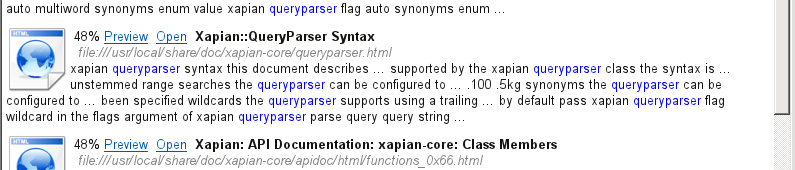
Simple+table
Same format, but using a table to avoid text flowing into the icon area.
<table>
<tr>
<td><img src="%I" align="left"></td>
<td>%R %L <b>%T</b><br>
<i><font color="#808080">%U</font></i> %i<br>
%A %K
</td>
</tr>
</table>

Using a small font to make the size/date details less obstrusive
<table>
<tr>
<td><img src="%I" align="left"></td>
<td><table bgcolor="#bababa">
<tr><td><div>
<font face="Tahoma, sans-serif"><u><b><a href="P%N">%T</a></b></u><br>
<font color=#008000>%L</font><br>
<font color=#510101>%A %K</font><br>
<font color=#0100FF>%U</font>
<p align="right"><font size=1><font color=#000000>%S
- %D
- %M</font></p>
</div></td></tr>
</table></td>
</tr>
</table>

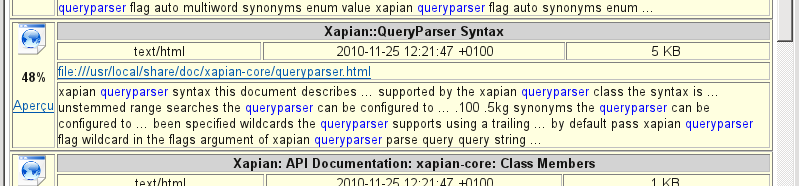
A very structured table
<table border="1" bgcolor="lightyellow">
  <tr>
    <td rowspan="4" width="40px" align="center" valign="center">
      <img src="%I" width="32" height="32">
      <p><b>%R</b></p>
      <p><a href="P%N">Aperçu</a></p>
    </td>
    <th colspan="3" bgcolor="lightgrey">%T</th>
  </tr>
  <tr>
    <td align="center">%M</td>
    <td align="center">%D</td>
    <td align="center">%S</td>
  </tr>
  <tr>
    <td colspan="3"><a href="E%N">%U</a></td>
  </tr>
  <tr>
    <td colspan="3">%A</td>
  </tr>
</table>
Web-like from the user manual
<u><b><a href="P%N">%T</a></b></u><br>
%U<br>
%A <font color=#008000>%S</font> - <a href="E%N">Edit</a>

Clean-Looking from the user manual
<table>
  <tr><td><img src="%I" align="left"></td>
    <td>%L <font color="#900000">%R</font> <b>%T</b><br>
      %S <font color="#808080"><i>%U</i></font>
      <table bgcolor="#e0e0e0">
        <tr><td><div>%A</div> %K </td></tr>
    </table></td>
</table>
