The original document describing XMP metadata usage with Recoll was written by Jeffrey Dick and is still available here. However it described using the old shell-based PDF Recoll input handler, which differs a lot from doing something equivalent with the current Python-based one (for which XMP capability is available from recoll 1.23.2, but the new handler can be used with previous Recoll versions).
This page was adapted from the text by Jeffrey Dick, using input from Johannes Menzel, (especially the result list paragraph format), adapting things for the new handler. The discussion which led to the updated handler is a Bitbucket Recoll issue.
Introduction
Organizing and searching a large collection of PDFs as part of a research project can be a demanding task. XMP metadata stored in a PDF, such as journal title, publication year, and user-added keywords, are often useful when searching for a publication.
Here, we describe customizing Recoll to retrieve this metadata, store it, and defining a result paragraph format to display it. See also a related wiki entry, Generating a custom field and using it to sort results, for sorting results on PDF page count.
Saving metadata to PDFs
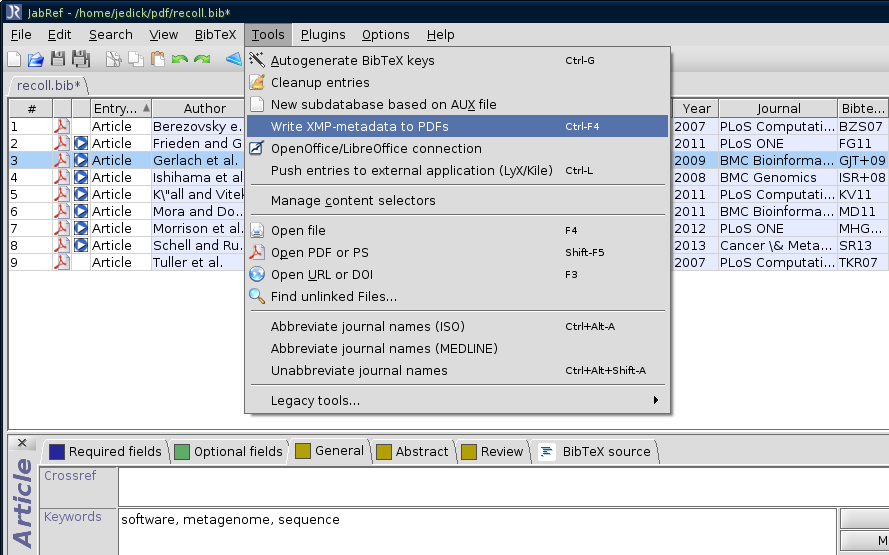
Bibliographic metadata can be saved in the PDF file itself. In the JabRef bibliography manager, this is done with the "Write XMP-metadata to PDFs" menu item. Note the presence of the keywords in the screenshot below; this field is a good place to tag the PDF with any words of your choosing to describe genre, topic, etc.
Custom indexing (fields file)
Let’s create two fields named "year" and "journal". The prefixes starting with "XY" are extension prefixes that are added to the terms in the Xapian database (Recoll internally does not use prefixes starting with XY). Additionally, the year and journal are stored so they can be displayed in the results list. Some other types of metadata, such as title, author and keywords, are already indexed by Recoll (the default rclpdf finds them using the pdftotext command) so there is no need to add those to the [prefixes] section.
Add this text to the fields file in your Recoll configuration directory (~/.recoll/fields).
[prefixes]
year = XYEAR
journal = XYJOUR

[stored]
bibtex:year =
bibtex:journal =
Telling the handler what fields to extract
As of Recoll 1.23.2, the PDF handler has the capability to use pdfinfo for extracting XMP metadata. The switch for executing pdfinfo is the pdfextrameta configuration parameter, and the value of the parameter is a list of XMP tags to extract, with optional conversion to Recoll field names (the XMP qualified tag name is kept by default). Example:
pdfextrameta = bibtex:year bibtex:journal bibtex:booktitle|titleHere, bibtex:year and bibtex:journal are used directly, and bibtex:booktitle is translated to title (the example is not supposed to make sense)
Editing the field values
Shortly after the 1.23.2 release, the new rclpdf.py was modified to enable calling external Python code for editing the values of the XMP metadata fields. The name of the external script is defined by the pdfextrametafix configuration variable, and it should define a MetaFixer class, with a metafix() method.
In practise, add the following to recoll.conf:
pdfextrametafix = /path/to/my/script.pyThe Python script could look like the following:
import sys
import re

# This can be used for local XMP field editing.
#
# A new instance is created for each PDF document (so the object could
# keep state to avoid, e.g. duplicate values)
#
# The metafix method receives an (original) field name, and the text
# value, and should return the possibly modified text.
class MetaFixer(object):
    def __init__(self):
        pass

    def metafix(self, nm, txt):
        if nm == 'bibtex:pages':
            txt = re.sub(r'--', '-', txt)
        elif nm == 'someothername':
            # do something else
            pass
        elif nm == 'stillanother':
            # etc.
            pass

        return txt
Indexing
Then index away!
Note that you can also run the rclpdf.py script manually,
e.g. rclpdf.py -d /path/to/some.pdf, to inspect the
output. If things are working correctly, the <head> consists of the
HTML meta elements, and the <body> contains the text of the PDF.
Result paragraph format
Here, the result is formatted to show the title, which is a link to open the document, in blue with underlining turned off. The next two lines contain the authors, then the journal title in green italicized text followed by year (in parentheses). The keywords are listed in red after the abstract/text snippet.
Edit this using the Recoll GUI: Preferences > GUI configuration > Result List > Edit result paragraph format string.
<table class="respar" style="padding-bottom: 10px;" cellspacing="5" cellpadding="5">
<thead style="vertical-align: top;">
<tr>
<td colspan="3" style="border-bottom: 1pt dotted #004070; font-size: smaller;"><a href="E%N">%u</a> | %S | Relevanz: %R</td>
</tr>
</thead>
<tbody style="vertical-align: top;">
<tr>
<td><a href="P%N"><img src="%I" alt="" width="64" height="auto" /></a></td>
<td style="width: 250px;"><span style="color: #004070;">
<div style="font-style: italic;">%(author)</div>
<div style="font-weight: bold;"><a href="E%N">»%T«</a></div>
<div style="text-transform: uppercase; margin-top: 5pt">%(reftype)</div></td>
<td>
<div style="font-size: smaller;">
%(refauthor)%(refchapter) %(reftitle)%(refeditor)%(refbooktitle)%(refjournal)%(refvolume)%(refnumber)%(refaddress)%(reflocation)%(refpublisher)%(refyear)%(refpages).</div>
<div style="text-align: justify; font-family: serif; margin-top: 5pt; margin-bottom: 5pt">»<a href="A%N">%A</a>«</div>
<div>%(refkeywords)</div>
<div style="font-size: smaller;"><a href="%(refurl)">%(refurl)</a></div>
<div style="font-size: smaller"> %(refkey) %(refisbn) %(refissn) %(refdoi)</div></td>
</tr>
</tbody>
</table>The screenshot below also has the Highlight color for query terms
set to black; font-weight:bold; for bold, black text (instead
of the blue default). There
are linkhttps://bitbucket.org/medoc/recoll/wiki/ResultsThumbnails[various
methods for creating the thumbnails]; the ones here were made by
opening the directory containing the PDFs in the Dolphin file manager
(part of KDE) and selecting the Preview option.
A search example
The simple query is cerevisiae keyword:protein. This
returns only PDFs that have the text "cerevisiae" and have been
tagged with the "protein" keyword. The LaTeX-style formatting from
the BibTeX database is displayed as HTML (note the italicized words
in article title, and umlaut in author’s name). Other queries could
be made based on the PDF metadata, e.g. journal:plos
r year:2013.
image::recoll_query.png
More possibilities
-
The sort buttons (up- and down-arrows) in Recoll sort the results by the modified date on the file at the time of indexing. If you want this sorting to reflect the publication year, then the timestamp should be set accordingly. If names of the PDFs contain the year (e.g. BZS2007.pdf, CKE+2011.pdf), the following one-liner would set the modified date to January 1st of the year:
for i in `ls *.pdf`; do touch -d `echo $i | sed 's/[^0-9]*//g'`-01-01 $i; doneNote that the publication year could then be shown in the result list using the stored date of the file (using "%D" in the result paragraph format, and date format "%Y") instead of having to add the year to the index as shown above.
-
The filter can be modified to fill in the "journal" field for BibTex entries that aren’t journal articles (e.g. bibtex:booktitle for "InCollection" entries).